Key Points
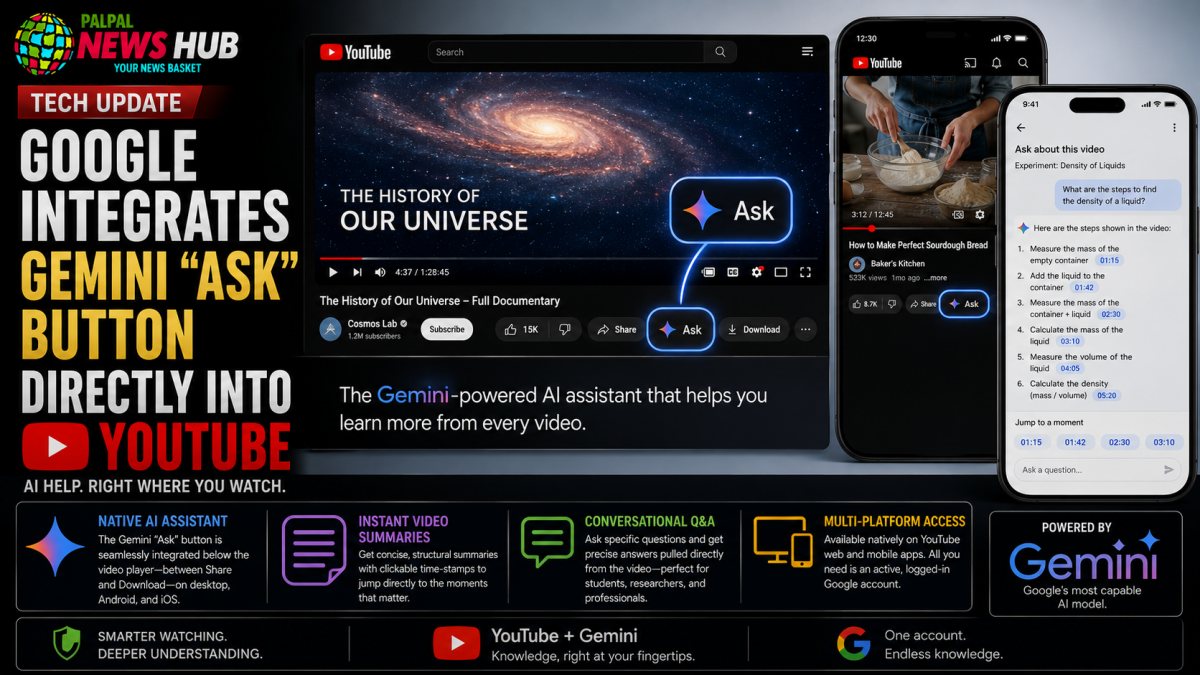
- Native AI Assistant: The Gemini-powered “Ask” button is placed directly below the video player, positioned seamlessly between the Share and Download options on desktop, Android, and iOS.
- Instant Video Summaries: Users can bypass hours of video footage, generating concise, structural text summaries alongside clickable time-stamps to jump directly to specific scenes.
- Conversational Q&A: The tool allows students, researchers, and professionals to query precise data within a video, such as extracting exact step-by-step instructions from a complex tutorial.
- Multi-Platform Access: The feature operates natively across YouTube web and mobile applications, requiring only an active, logged-in Google account for eligibility.
In a significant upgrade to its digital ecosystem, Google has officially integrated its flagship AI assistant, Gemini, directly into the core YouTube interface. The rollout introduces a new feature simply titled “Ask,” designed to completely transform how users consume, navigate, and study video content. By implementing an interactive AI layer alongside traditional playback, Google aims to eliminate information overload for individuals with hectic schedules, demanding office workloads, or extensive academic assignments.
The native tool changes the traditional viewing experience into an active, two-way conversation. Rather than scrubbing aimlessly through timeline scrubbers or relying on vague creator-generated chapter markers, viewers can delegate the heavy lifting to Gemini, which analyzes the video’s transcript and visual context on the fly to deliver immediate, structured insights.
How the “Ask” Tool Operates Natively
The operational layout of the update is designed for maximum accessibility. When a user opens an eligible video on the YouTube mobile app or desktop site, the new “Ask” button appears clearly below the video player, right alongside standard engagement icons. Clicking the Gemini star icon pulls up an interactive chat panel without navigating away from the stream.
[ YouTube Video Player ]
─────────────────────────────────────────────────────────
  👍 Like   👎 Dislike   ↩️ Share   ✨ Ask (Gemini)   📥 Download
─────────────────────────────────────────────────────────
To access the interactive sidebar, users must be actively signed into their Google accounts. Once activated, Gemini presents quick-action prompts, such as “Summarize this video,” or opens a blank dialogue field where users can input custom, natural-language queries. Alternatively, users can leverage this functionality from the standalone Gemini web or mobile app by pasting a direct YouTube video link into the chat box.
Timestamps and Step-by-Step Breakdowns
The platform’s capability goes far beyond generating generalized paragraphs. When processing a lengthy tech review, lecture, or financial seminar, Gemini divides the content into distinct, thematic chapters accompanied by precise, hyperlinked timestamps. If a viewer has already watched the first half of a clip but took an extended break, they can instruct Gemini to summarize only the remaining, unwatched segments to pick up right where they left off.
For practical learners, the tool excels at transforming fast-paced video tutorials into clear, actionable guides. For example, a home cook or software developer looking at an hour-long instructional video can ask the AI to list the exact ingredients or code blocks mentioned, complete with immediate links to the precise moment those items appear on screen.
Implications for Modern Content Discovery
Tech experts suggest that this strategic integration marks a massive leap forward in the evolution of digital search, closely complementing the conversational “Ask YouTube” search discovery tools unveiled at Google I/O 2026. By turning the platform’s massive video catalog into a fully indexable, query-ready database, Google is providing students, corporate professionals, and casual viewers with a highly powerful mechanism to parse deep text details out of a strictly visual medium, signaling an era where long-form video content is instantly searchable down to the exact second.