

































Key Points
- WhatsApp has started a phased rollout to a limited number of users, with the latest app updates on both Android and iOS offering support for the feature.
- Usernames replace the need to share phone numbers, offering a significant privacy upgrade for billions of users.
- Users can import their existing Facebook or Instagram handle as their WhatsApp username, or create a brand new one.
- A 4-digit username key adds an optional extra layer of security, controlling who can initiate contact.
- A broader global rollout and business integration is planned for the rest of 2026.
WhatsApp, with over two billion active users, has for years required people to share their phone numbers just to start a conversation, making privacy a persistent concern. That is now changing. The shift brings WhatsApp more in line with other social platforms, striking a balance between discoverability and maintaining greater privacy by not disclosing a phone number.
The development of the username feature took longer than expected due to the complexity of overhauling WhatsApp’s core identification system, as engineers needed to redesign large parts of the app’s infrastructure to ensure compatibility, scalability, and full encryption support for username-based interactions.
How It Works
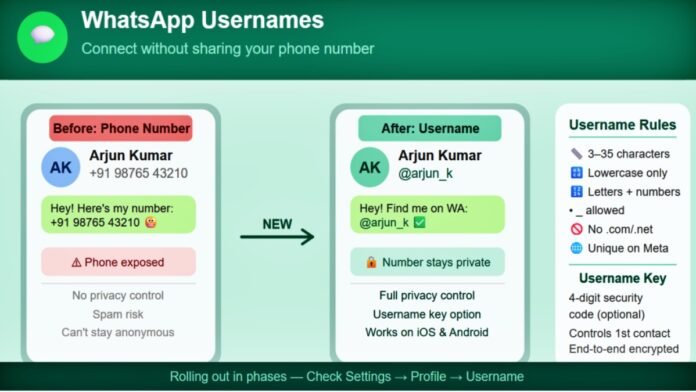
The feature is available on both iOS and Android and allows users to search, chat, and make voice or video calls without sharing their phone numbers, offering a more private and flexible communication experience, especially when interacting with new contacts or businesses.
To check if the feature has reached your account, open WhatsApp and head to Settings. If support has been rolled out to you, you’ll see a dedicated Username section. Tap the new option, and you’ll be taken to the username creation screen.
Rules for Choosing a Username
Before claiming your handle, there are a few guidelines to keep in mind:
- Usernames must be between 3 and 35 characters and can only include lowercase letters (a–z), numbers (0–9), periods, and underscores.
- Usernames cannot start with “www” or end with popular top-level domains like “.com” or “.net,” and every username must contain at least one letter.
- For a username to be successfully claimed, it must be available not just on WhatsApp but also on other Meta platforms like Instagram and Facebook. If someone else already holds the handle on those platforms, you will need to verify ownership through Meta’s Accounts Centre, or choose a different one.
The Username Key: Extra Security
WhatsApp is also providing an optional username key, a four-digit code that the user can choose to regulate who gets access to sending them messages initially. Only those individuals who know both the username and the key will be able to initiate contact. Once a conversation is established, all messages remain protected by end-to-end encryption.
What This Means for Businesses
The update has deeper implications for businesses operating on WhatsApp’s platform. The rollout includes a new Business-Scoped User ID (BSUID), a unique identifier assigned to each WhatsApp user that allows businesses to message them even when their phone number is not known. Businesses retain the ability to message known phone numbers regardless of usernames, and users without usernames will experience no change in phone number visibility. Meta has asked businesses to update their CRM tools and API integrations to support the new BSUID system by June 2026.
When Will You Get It?
The feature is currently available only to a small group of users, with WhatsApp taking a gradual and controlled approach. A broader rollout is expected in the coming months, depending on performance and user feedback. If the username option has not yet appeared in your profile settings, a future app update should bring it to you.