
































Key Points
- Cardless Convenience: Users can withdraw cash using only a smartphone and a UPI app.
- Enhanced Security: The system eliminates risks associated with physical cards, such as skimming and cloning.
- Broad Availability: Major banks and ATM service providers like Hitachi and NCR have rolled out UPI-enabled machines across India.
- Transaction Limits: Most UPI-ATM transactions are currently capped between ₹5,000 and ₹10,000 for security reasons.
In the rapidly evolving digital age, the traditional necessity of carrying a physical debit card is becoming obsolete. The Reserve Bank of India (RBI) has actively encouraged the adoption of Interoperable Cardless Cash Withdrawal (ICCW) using UPI, a move designed to make banking more accessible and secure. This technology allows customers of any participating bank to withdraw cash from any UPI-enabled ATM, regardless of whether they have their wallet or card on hand.
The shift toward UPI-ATMs is not just a matter of convenience; it represents a fundamental upgrade in financial security. For years, “skimming” and “cloning” have been primary methods for cybercriminals to steal card data by installing malicious devices on ATM card slots. By removing the physical card from the equation, the surface area for such fraud is virtually eliminated.
Understanding UPI Cash Withdrawal
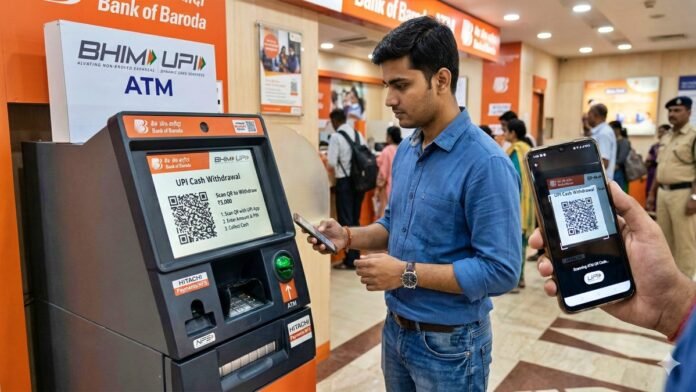
Withdrawing cash via UPI is a seamless digital process that bridges the gap between mobile payments and physical currency. Unlike traditional transactions, where the ATM reads a magnetic stripe or chip, the UPI-ATM functions as a digital interface.
When a user selects the “UPI Cash Withdrawal” option, the ATM backend generates a unique, dynamic QR code. This code is encrypted and time-bound, ensuring that it cannot be reused or intercepted for fraudulent purposes. By scanning this code with a standard UPI app, such as GPay, PhonePe, or BHIM, the user authorizes the bank to release funds through the existing UPI infrastructure.
Step-by-Step: How to Use a UPI-ATM
The process is designed to be intuitive, requiring only a few seconds to complete:
- Locate a Compatible ATM: Look for ATMs displaying the “UPI Cash Withdrawal” or “ICCW” logo on the home screen.
- Select UPI Cash: Tap the “UPI Cash” or “QR Cash” option on the ATM’s touchscreen.
- Enter the Amount: Input the desired withdrawal amount (ensure it is within the supported limit).
- Scan the QR Code: A single-use QR code will appear on the ATM screen. Open your preferred UPI app and scan it.
- Authorize on Mobile: Your phone will prompt you to select the linked bank account and enter your secure UPI PIN.
- Collect Cash: Once the app confirms the transaction, the ATM will process the request and dispense the cash.
Security and Technical Considerations
While the technology offers significant advantages, there are a few technical prerequisites and limitations to keep in mind. Users must ensure their UPI application is updated to the latest version to support ICCW protocols. Additionally, a stable mobile internet connection is required to authorize the transaction on the smartphone.
Current industry standards typically limit these cardless transactions to ₹10,000 per day per account, though individual banks may set lower thresholds, such as ₹5,000. These limits act as a safeguard, ensuring that even in the event of unauthorized phone access, the potential for loss is restricted. As the technology matures, it is expected that these limits may be adjusted to mirror traditional debit card permissions.
Currently, most major public and private sector banks in India support Interoperable Cardless Cash Withdrawal (ICCW), the technology behind UPI-ATM transactions.
The following banks and networks allow you to withdraw cash by scanning a QR code:
Major Participating Banks
- Public Sector Banks: State Bank of India (SBI)
- Bank of Baroda
- Canara Bank
- Union Bank of India
- Indian Bank
- Indian Overseas Bank (IOB)
- UCO Bank
- Bank of Maharashtra
- Private Sector Banks:
- HDFC Bank: Recently updated its policy to treat UPI withdrawals as “regular” ATM transactions for fee calculation purposes (starting April 2026).
- ICICI Bank
- Axis Bank
- Yes Bank
- IDFC First Bank
- Federal Bank
- IndusInd Bank
- Karnataka Bank
Supported ATM Networks & White Label ATMs
Even if you don’t see your specific bank’s ATM, you can often use “White Label” ATMs (third-party ATMs) that support the National Financial Switch (NFS):
- Hitachi Money Spot: Launched India’s first dedicated UPI-ATM in collaboration with NPCI.
- NCR Corporation ATMs: Many upgraded NCR machines across the country now support dynamic QR codes.
Key Points to Remember
- Interoperability: You can generally use any bank’s UPI app (GPay, PhonePe, BHIM, PayZapp) at any supported ATM, regardless of which bank owns the machine.
- Limits: Most banks allow a maximum of ₹10,000 per transaction. Some, like HDFC, have a daily cap of ₹20,000 for UPI-based withdrawals.
- Charges: Starting April 1, 2026, banks like HDFC will count these cardless withdrawals toward your monthly “free” ATM transaction limit (typically 3-5 per month).