





























Key Points
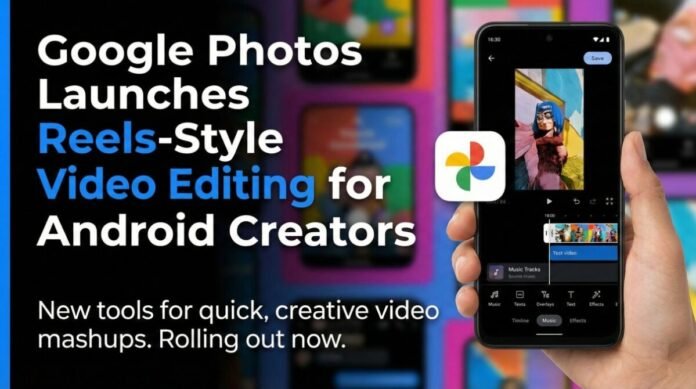
- Google Photos adds five video editing features for Android, rivaling Instagram Reels and YouTube Shorts
- AI automatically syncs highlight videos with music and media in the new “Create” tab
- Pre-built templates with preset music, text, and cuts enable instant video creation
- Redesigned editor offers multi-clip editing, improved timeline, and adaptive canvas on Android and iOS
- Built-in music library and custom text options with fonts, colors, and clip-level controls now available
- New editor becomes default for Android users, streamlining mobile content creation workflow
The standout feature automatically creates polished highlight videos synced perfectly to music beats and visual moments. Users tap the “Create” tab, select “Highlight Video,” choose their photos and video clips, and Google’s AI handles the complex editing work. The algorithm analyzes motion, faces, and key moments in your media, then arranges them rhythmically with automatic cuts that match the music’s tempo.
For Reels creators and vloggers, this eliminates hours of manual beat-matching. The AI suggests optimal clip lengths, applies smooth transitions, and even recommends the best photos from your gallery based on image quality and composition. Early testing shows the feature works particularly well for travel vlogs, event recaps, and daily life montages, creating engaging content in under 30 seconds.
Instant Creation With Pre-Built Templates
Google Photos now includes a growing library of professionally designed video templates that come pre-loaded with music, animated text styles, and timed cuts. These templates cater to popular formats like “Day in My Life,” “Travel Diary,” “Food Review,” and “Fitness Journey.” Users simply select their media, and the template automatically applies a cohesive style.
The company plans to add seasonal templates for festivals like Diwali and Holi, recognizing the Indian creator market’s specific needs. Template categories will expand to include business promotions, educational content, and trending Reels formats. This feature democratizes professional editing, allowing beginners to produce viral-worthy content without learning complex software.
Redesigned Video Editor With Professional Timeline
The overhauled video editor brings desktop-class tools to mobile devices. Multi-clip editing lets users layer multiple video tracks, while the improved timeline offers frame-by-frame precision with pinch-to-zoom functionality. The adaptive canvas automatically adjusts aspect ratios for different platforms, Instagram Reels (9:16), YouTube Shorts (9:16), or traditional posts (1:1, 4:5).
Available on both Android and iOS, the editor reduces editing time by up to 60% according to Google’s internal testing. Storyline creation becomes intuitive with drag-and-drop reordering, and the new snap-to-grid feature helps align clips perfectly. For Android users, this editor now functions as the default video editor system-wide, meaning videos opened from any app can be edited directly in Google Photos.
Built-In Music Library for Emotional Impact
Creators can now access thousands of royalty-free tracks across genres like pop, hip-hop, classical, and regional Indian music directly within Google Photos. The library includes mood-based categories such as “Energetic,” “Emotional,” “Festive,” and “Cinematic,” helping creators match music to their video’s tone. Each track is pre-cleared for social media use, eliminating copyright concerns on Instagram and YouTube.
The feature includes smart recommendations that suggest tracks based on your video’s content and pacing. For instance, a video with fast cuts and outdoor action might suggest upbeat tracks, while a slow-motion montage could recommend ambient music. Users can also trim songs, adjust volume levels, and add fade-in/fade-out effects for professional polish.
Custom Text and Clip-Level Editing Controls
The new text tool offers stylish overlay options with customizable fonts, colors, backgrounds, and animations. Creators can add different music tracks or text styles to individual clips within a single video, creating dynamic storytelling. The editor includes trending text animations popular on Reels, like typewriter effects, bounce animations, and gradient backgrounds.
Clip-level editing allows precise control over each segment’s speed, filters, and audio. Users can apply slow-motion to specific moments, add glitch effects to transitions, or adjust brightness clip-by-clip. For Android users, this granular control was previously only available in paid apps like Adobe Premiere Rush, but now comes free within Google Photos.
Competitive Landscape and Creator Impact
These features position Google Photos as a direct competitor to CapCut, InShot, and Instagram’s native editor. Unlike third-party apps, Google Photos offers unlimited cloud backup for edited videos (within storage limits) and seamless sharing to any platform. The integration with Google One means creators can access their projects across devices instantly.
For India’s booming creator economy, which added 45 million new content creators in 2024, this update removes financial barriers. Small-town creators who couldn’t afford premium editing subscriptions can now produce professional content using just their phone and Google account. The inclusion of regional music templates specifically caters to Indian festivals and cultural moments.
Availability and Future Roadmap
The features began rolling out to Android users on December 10, 2025, and will reach all users globally by December 15. iOS users will receive the update in early January 2026. Google plans to add AI voiceover generation, auto-captioning in multiple Indian languages, and collaborative editing features in future updates.
The company is also testing a “Creator Mode” that offers advanced color grading, green screen effects, and direct publishing to YouTube Shorts and Instagram Reels. No additional storage fees apply for edited videos, though they count toward your existing Google Photos storage quota.